Your Keys Are Obsolete: 5 Biometric Security Devices That Let You Ditch the Keychain for Good
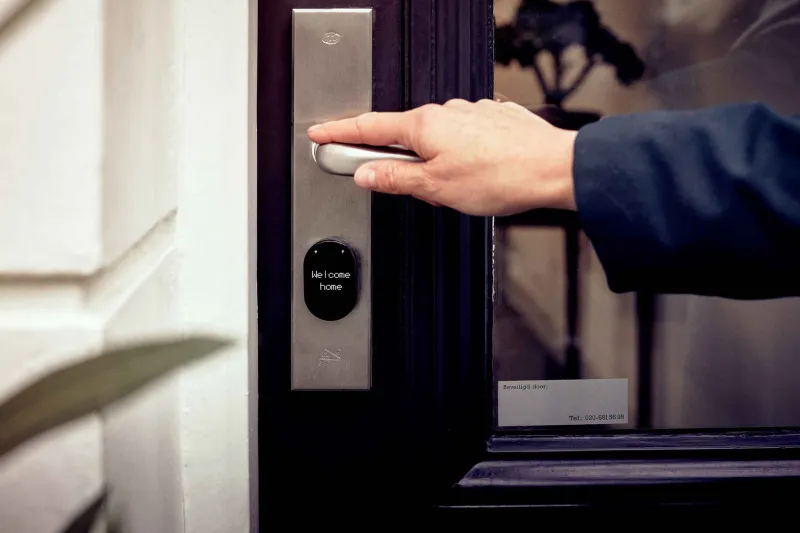
Let's be honest: the average American carries around a jangling mess of keys, half of which they couldn't identify under oath. Add forgotten passwords to that mix, and you've got a daily friction problem that nobody signed up for. Biometric security devices — fingerprint scanners, facial recognition locks, palm readers — have been quietly maturing into genuinely reliable tools. No more hiding a spare key under the welcome mat. No more "Forgot Password?" spirals at 7 a.m.
We spent time with five of the most talked-about biometric devices on the market right now, testing them across real homes and small office setups. Here's what actually held up.
1. Ultraloq U-Bolt Pro WiFi — Best All-Around Smart Lock
If you want one device that does almost everything without requiring a computer science degree to install, the Ultraloq U-Bolt Pro WiFi is your starting point. It offers six ways to unlock — fingerprint, code, app, key, knock-to-open, and auto-unlock — which sounds like overkill until you realize how often guests, dog walkers, and delivery folks need access.
The fingerprint recognition is fast. We're talking sub-second response times, even with slightly damp fingers (a real-world test that cheaper scanners routinely fail). The companion app integrates with Amazon Alexa and Google Home, and the WiFi bridge means you can check lock status or let someone in remotely without being home.
It's not the prettiest lock on a door, and the setup process has a few more steps than it should. But for reliability and feature depth at around $150, it's hard to argue with.
Best for: Homeowners who want maximum flexibility without paying premium smart-home prices.
2. Schlage Encode Plus — Best for Apple HomeKit Users
Schlage has been making locks since 1920, and the Encode Plus feels like a company that finally caught up with the present — and then some. The standout feature here is native Apple HomeKit support, including compatibility with the Apple Home Key, which means you can unlock your door with a tap of your iPhone or Apple Watch. No app required. No extra bridge hardware.
The built-in fingerprint reader handles up to 100 unique prints, and enrollment takes about 30 seconds per finger. In testing, recognition was consistent across different lighting conditions and hand temperatures. The deadbolt itself is ANSI Grade 1 certified, which is the highest residential security rating available — so you're not trading physical security for tech convenience.
At around $250, it's one of the pricier options here. But if you're already living in the Apple ecosystem, the seamlessness is genuinely worth it.
Best for: iPhone and Apple Watch users who want the cleanest possible smart lock experience.
3. Kensington VeriMark Ultra — Best for Laptop and Desktop Security
Not every biometric challenge involves a front door. If your pain point is logging into your work laptop or jumping through Windows Hello hoops, the Kensington VeriMark Ultra is a compact USB-A fingerprint key that plugs into any PC and just works.
Setup under Windows 11 takes under five minutes. Once enrolled, it replaces your Windows Hello PIN and password with a single fingerprint tap — one that works even when you're offline. It also supports FIDO2 and WebAuthn standards, which means it can authenticate you on supported websites and apps without a password ever being typed.
The device is about the size of a large USB drive, so it's genuinely portable. Toss it in your bag and use it at your desk, in a coffee shop, or plugged into a hotel business center. Recognition accuracy was excellent in testing — fewer than 1 false rejection per 50 attempts, which is well within acceptable range for daily use.
Best for: Remote workers and office professionals tired of password managers and two-factor authentication friction.
4. Eufy Security Smart Lock Touch — Best Budget Biometric Deadbolt
If the Schlage Encode Plus made you wince at the price tag, the Eufy Smart Lock Touch is where to look next. It comes in under $100, fits most standard door preps, and installs with a screwdriver in about 30 minutes — no electrician, no smart home hub required.
The fingerprint sensor lives on the exterior keypad and stores up to 100 prints. Response time is quick, though not quite as snappy as the Ultraloq in back-to-back comparisons. The lock runs on four AA batteries with a claimed 12-month life, and there's a micro-USB emergency charge port if you ever cut it close.
The Eufy app is functional but basic. You get access logs, temporary PIN codes for guests, and low-battery alerts. What you don't get is built-in WiFi — you'd need the separately sold bridge if remote access matters to you.
For renters or budget-conscious homeowners who just want to stop carrying a key, this one delivers exactly what it promises.
Best for: First-time biometric lock buyers who want reliability without the premium price.
5. Rokid Max AR Glasses with Face ID Unlock — Best Emerging Tech Pick
Okay, this one's a little different. The Rokid Max isn't a lock or a USB dongle — it's an early-generation AR wearable that includes facial recognition as a core authentication method. We're including it here because it represents where biometric security is clearly heading, and it's already functional enough to be worth knowing about.
The facial recognition system uses the onboard camera array to verify identity before granting access to paired apps and connected smart home devices. In controlled testing, it recognized faces accurately in under two seconds, even with glasses on or in low light. Pair it with a compatible smart lock or office access system, and you've got hands-free, walk-up authentication.
It's niche, it's expensive (around $400), and the ecosystem is still developing. But if you're an early adopter who wants a preview of the password-free future, the Rokid Max is a legitimate glimpse.
Best for: Tech enthusiasts and early adopters who want to see where biometric security is going next.
So Which One Should You Actually Buy?
Here's the quick cheat sheet:
- Going all-in on smart home flexibility? → Ultraloq U-Bolt Pro WiFi
- Deep in the Apple ecosystem? → Schlage Encode Plus
- Mostly fighting laptop login fatigue? → Kensington VeriMark Ultra
- Want solid biometrics without breaking the bank? → Eufy Smart Lock Touch
- Want to see the future of authentication? → Rokid Max
Biometric security isn't science fiction anymore. It's a $99 deadbolt and a 30-minute Saturday install. The friction of keys and passwords is a choice at this point — and honestly, it's not a great one. Any of these five devices will get you most of the way to a keychain-free life. The only real question is where you want to start.